The Complete Blueprint for a Google Workspace to Microsoft 365 Migration

Moving an entire organization from one cloud ecosystem to another is a significant operational shift. When executing a Google Workspace to Microsoft 365 migration, the challenge isn’t just moving files from point A to point B. The real complexity lies in preserving data integrity, maintaining user productivity, and keeping systems secure during the transition.
Without a structured deployment plan, businesses often face broken sharing links, lost calendar metadata, and disruptive user downtime.
This comprehensive guide covers the essential technical phases of a successful cross-cloud migration and explains how to navigate the most common configuration pitfalls.
Phase 1: Environment Discovery and Scope Pre-Requisites
Before moving any data, you must perform a thorough discovery audit of your source Google Workspace tenant. Do not rely on guesswork; unmanaged data creates significant latency during processing.
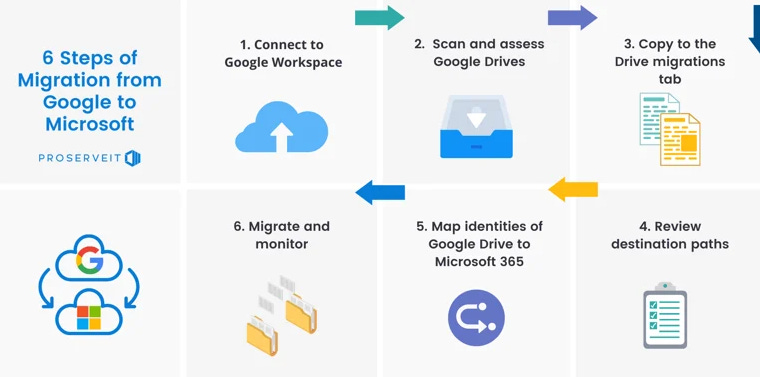
Your discovery checklist must account for:
Primary Mailboxes and Archives: Total storage size, item counts, and large attachments exceeding Microsoft 365’s default limits.
Google Drive Architecture: Distinguishing between user-owned My Drive content and organizational Shared Drives.
Identity Infrastructure: Mapping Google primary SMTP addresses and aliases to your target Microsoft Entra ID (formerly Azure AD) directories.
Phase 2: Core Infrastructure and Identity Mapping
A successful transition depends on clean identity provisioning. If your user accounts are not correctly matched in the cloud before data copy routines begin, data permissions will fail to map.
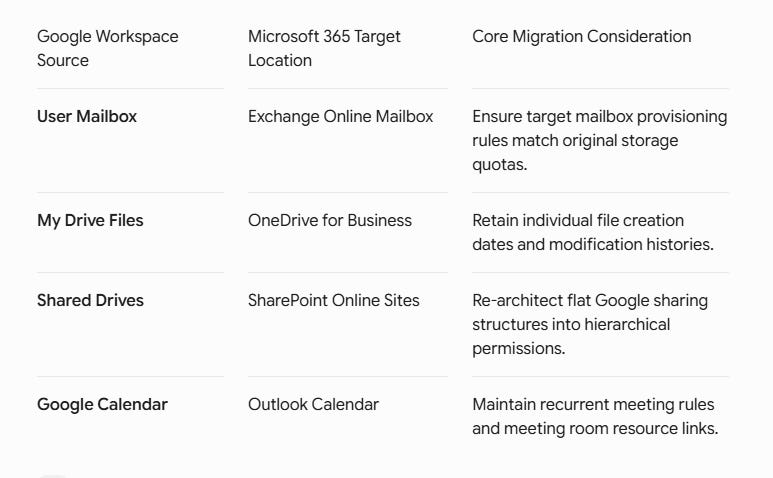
Phase 3: Mitigating the 3 Biggest Data Risks
1. The Google Doc Conversion Paradox
Google files (Docs, Sheets, Slides) do not possess a native file size until they are exported. During a migration, these files must be programmatically converted into corresponding Microsoft formats (docx, xlsx, pptx). Complex formula scripts in Google Sheets may require manual remediation post-transfer to ensure business logic remains functional.
2. Shared Link Preservation
Google relies heavily on localized file sharing links. Once data moves to SharePoint and OneDrive, those old URLs will no longer resolve. IT administrators must plan an internal communication campaign to guide teams on generating new shared links within the Microsoft environment.
3. Delta Synchronization Routines
To avoid business disruption, execute the bulk data transfer in the background while your team continues working in Google Workspace. Once the initial copy is complete, run a final Delta Sync right before your DNS switch to capture only the latest changes made over the weekend.
Phase 4: Executing the Mail Flow Cutover (DNS Switch)
The final cutover requires precision timing to ensure zero email loss. This occurs during a scheduled maintenance window by modifying your domain’s DNS zone records:
1.Reduce TTL Values: 24-48 Hours Prior.
Lower your Time-To-Live (TTL) settings on your domain’s MX records to 300 seconds. This ensures internet mail servers process your upcoming routing changes rapidly.
2.Run the Final Delta Copy: Cutover Window.
Stop active user edits in Google Workspace and execute the final sync pass to transfer remaining emails, calendar updates, and drive modifications.
3.Go-Live Moment: Update MX and TXT Records.
Point your MX records directly to Exchange Online (yourdomain-com.mail.protection.outlook.com). Update your SPF, DKIM, and DMARC TXT records immediately to maintain email security and prevent spam filtering issues.
Frequently Asked Questions:
Will my users lose their calendar invites and recurring meetings?
Primary event metadata transfers cleanly during a professional migration. However, calendar links pointing back to Google Meet rooms will need to be updated to Microsoft Teams links by the meeting organizers.How long does a Google Workspace to Microsoft 365 migration take?
The duration depends entirely on total data volume, throttling limitations, and structure complexity. A business with 50 users can complete a cutover within a couple of weeks, while large scale enterprise deployments require several months of deep staging and wave-based planning.
Need Expert Guidance for Your Cloud Transition?
A cloud migration involves moving your entire operational foundation. Planning the ideal architecture up front prevents security misconfigurations and unexpected downtime.
If your organization is planning an upcoming ecosystem change, partner with experienced specialists. The cloud infrastructure team at Star Knowledge provides tailored assessment, data mapping, and complete end-to-end execution to ensure your transition is seamless and secure.
Explore Star Knowledge Cloud Migration Services to secure a comprehensive technical evaluation for your infrastructure today.